Showing posts with label digital filmmaking. Show all posts

Thursday, October 25, 2012

How Apple's new computers impact filmmaking


The new Macbook Pro and iMac announced by Apple on October 24 heralds a major shift in the way PCs will be designed and have a cumulative impact on digital filmmaking.


Below are some of the major upgrades that affect the digital filmmaking process:

1.    No Optical Drive: Both the new Macbook Pro with retina display and the new iMac have done away with the DVD drive, with Apple calling it  obsolete in the age of blazing broadband speeds when movies and television can be easily streamed online or downloaded. The new iMac does have 2 Thunderbolt ports and 4 USB 3.0 ports to allow connection of external hard drives and other devices. Seeing that Apple is usually the trendsetter in computer design, we can expect competitors like HP and Dell to follow suit. This could spell the death knell for the DVD industry, and moviemakers will now be looking to go completely digital. Of course, home theatre systems and bluray players will ensure that the home video market doesn’t completely evaporate in the near future, but the transition to a more 'online' movie watching experience is surely on its way.  

2.    Much better screen resolutions: The new iMac has a full HD display (1,920 × 1,080 pixels) for the 21.5” version and 2,560 × 1,440 pixel for the 27” version. It certainly translates into a better film/video watching experience and the computer being used for watching movies and gaming more than ever. The Macbook Pro with Retina display boats of a tantalizing 2,560 x 1,600 at 227 pixels per inch. This one has four times the screen resolution of the previous 13-inch version of the MacBook Pro.

3.    Super powerful processors: The new 21.5” iMac starts with a config of Intel Core i5 Quad Core 2.7 Ghz Processor with 8GB RAM , 1GB dedicated NVIDIA graphics and 1TB hard disk. Even the Macbook Pro with Retina display is all about performance, speed and graphics. It boasts of an Intel dual-core i5 Ivy Bridge processor clock at 2.5 Ghz (minimum) For graphics it has the Intel HD 4,000 graphics support. The RAM is 8 GB and its all-flash storage has three configurations available: 256 GB, 512 GB, or 768 GB. Such top-end configurations in the base models bode well for popular film editing applications like Final Cut Pro.  Apple will be looking to release an even more powerful version of its flagship video editing app to utilize the full potential of its new line of computer devices.

The rise of smartphones and tablets coupled with faster broadband speeds have already given a fillip to the various kinds of digital filmmaking, both in terms of production and post production.  Apple’s new line of smart computers will be prove to be another turning point, particularly because the optical drive has been dropped across its iMac and Macbook Pro ranges.

What do you think of Apple’s new devices, and their potential impact on filmmaking?

Tuesday, January 31, 2012

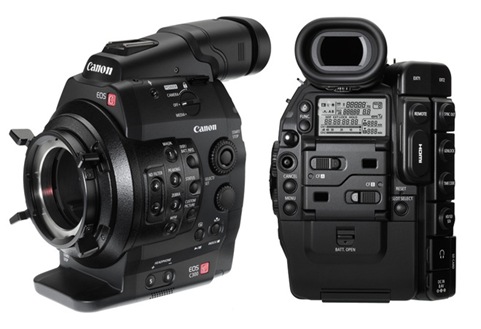
Canon C300 poised to take over Hollywood?

Canon c300 video camera

The EOS C300 – the latest Digital for Film camera from Canon – starts shipping from today. Aiming to compete directly against the Reds of the world, it carries a Super 35mm CMOS sensor capable of up to 4K resolution 1080p capture, and should be helped in large part by the company's top-shelf lenses; like the 14.5 - 60mm and 30 - 300mm. When we first learnt about C300, it was priced at a hefty $20,000. But that's no longer the case, instead it'll cost a less painful $16,000 for the body only.

Canon has always made video cameras alongside its stills cameras, and the EOS C300 is really the natural evolution of the 5DMkII.

Canon took principles of the 5D — a full-frame SLR which shoots hi-def video — and developed it into a proper movie camera. The sensor is a conservative 8.3MP, and it records 1080p video in each of the three color channels. These pixels are big, for good low-light performance, and the movies are recorded to standard CF cards.

canon c300 for tv

From there, things get very movie-techy. The C300 records in the open-source MXF (Material eXchange Format), can capture compressed MPEG2 Full HD, uses 4:2:2 color sampling and hooks up with all manner of movie accessories. In short, unless you’re a movie pro, not much of this camera will be familiar to you.
The new camera will be joined by a range of EF and PL mount lenses, and in Canon also has a 4K-capable SLR camera in the making.

Canon is counting on a wider range of offerings as digital cinema gets more serious. There’s time. The first significant all-digital movie came out a decade ago: Once Upon a Time in Mexico, where “significant” applies more to digital cinematography than to the flick. Some movies are shot with a combination of film and, for special effects, digital. Even in Hollywood, the ability to streamline production and see daily rushes without the cost and delays developing and printing film, can be an important money-saver when studios shoot all-digital.

Thursday, June 17, 2010

Latest Web startups for filmmakers

As the author of the Digital Filmmaking Blog I often get emails about the launch of a new film camera or filmmaking scholarhip or film training program requesting to get featured on this blog. Often I find those things overtly promotional and commercial and decide to ignore them. But I would like to list a few good web startups for filmmakers:

1. Tyro TV: tyrotv.com is a website that's intended for emerging television and filmmakers. They are sponsoring a new kind of online film festival/contest. According to the site owner,


We give young filmmakers a topic and everything they need to create their own movie -- video, music, and sound effects. Then let them create the best short film they can using these materials. Because everyone's using the same "building blocks," contestants will be judged not by their budget but on their creativity and storytelling abilities.

Their first competition is called "The Marijuana Mash-Up." For this contest, they are asking contestants to “mash up” (that is, creatively condense and re-edit) an hour’s worth of hilariously dated drug education films from the 50s and 60s to create a short campaign commercial that convinces people to vote for or against legalizing marijuana. The contest is motivated by the California initiative that'll be on the ballot this fall, but young filmmakers across the country have passionate views on this issue, to say the least! Finalists will be named late in the summer and a winner just before the election.

2. Fleetflicks: FleetFlicks.com is trying to revive the short film as both art and entertainment. It's a place for filmmakers to expose their work to an international audience. The site hopes to spread the word to a diverse viewership and combat the stigma that the short film is only for crotch-punch and cat videos. The site has been up for a few months and has gathered a lot of followers, many of whom have uploaded their short films on the site.

3. Student Film Makers of India: SFMI is a site for student film from India where they can upload their films, make their profile and network with other film makers. The website has a decent design and has got quite a few members already who have uploaded their short films and animations there.

Monday, September 08, 2008

New Concept in Digital Filmmaking

The best part of digital filmmaking is that it can be highly innovative, and of course, such innovation lies in the imagination of the beholder! Leapfrogging technologies and the ever expanding internet with its plethora of options has been instrumental in bringing about a seachange in the way films are made.

Today, I am talking about a do-it-yourself collaborative filmmaking website called RootClip.com, where the creative team make a short video clip or "Rootclip" to start the story. Amateur filmmakers watch their video, then shoot their own rendition of what should happen next in less than 2 minutes. The result is an entire short film made by amateur filmmakers.


I think it's pretty exciting. Their last film actually debuted at the Travese City Film Festival. ust say this has got a lot of potential.

Tuesday, March 04, 2008

5 Important Video Codecs You Must Know


A video codec is a device or software that enables video compression and/or decompression for digital video. Digital video codecs are found in DVD (MPEG-2), VCD (MPEG-1), in emerging satellite and terrestrial broadcast systems, and on the Internet.

Below are 5 Must Know Video Codecs and their features

1. H.263 – use for video conferencing
This codec is a good choice for the business community. It’s ideal for a video conference where you do not need high-quality pictures and where audio is going to take priority. It is best with low movement films, so a more or less stationary talking head is going to be just perfect. The data rate for thiswould be small, but much quality is lost. Perhaps the only use of this codec is if you wanted to send aquick version of a film for viewing by a co-worker; you may not worry too much about the way it looksas you just want quick feedback.

2. Cinepak – use for CD-ROMs
This is a good, well-established system which works best with small image sizes. This codec is outperformed by many others, even though its small picture size, at 120x90 pixels, is now getting bigger as computers improve. It is better used on low-end machines but is not usually the first option for web film, being more suited to CD-ROMs. A big advantage with this codec is that it allows the sender to customize settings throughout a film, so you can apply heavier compression to places where there is notmuch movement but lighter compression to where you need more detail on screen, perhaps during anaction sequence. This process avoids ‘data spikes’, where sudden increases in data cause a movie to stopplaying on the user’s PC because too much data is needed.

3. RealG2 – good for web work, not for other uses
This codec is widely used on the web. It uses ‘temporal scaleability’, which means that the result forthe user is smoother than others even on a wide range of computers or devices. This means movies encoded with it play at a high frame rate for fast processors and low for slow ones. This codec is hard to beat in terms of the number of users who may have access to it on the web and the ease with which the rest can download it (for free).

4. Sorenson – good all-rounder
This is a really good, high-quality codec and looks better than most at a screen size of 320x240. It’sa good solution for movies that are going to be viewed over broadband connections, but some editions (notably the Developer Edition) cater for the other users by enabling scaleable streaming. One aspect which puts many people off using this codec is the length of time it takes to encode a movie in this way,but it remains the method of choice for most short movies, for the web and CD.

5. Intel Indeo 4 and 5 – good, but mainly for high power
With this method of compression you get a good result with high picture quality, but it is only viablefor high-powered PCs or Macs. Version 5 allows for progressive downloads. Intel’s codec is generally better than Cinepak, but cannot match the picture quality of the Sorenson.

Sunday, September 23, 2007

Entries Sought for 9th Annual PlanetOut Short Movie Awards

PlanetOut Inc. , the leading media and entertainment company exclusively focused on the gay and lesbian market, is seeking entries for the 9th Annual PlanetOut Short Movie Awards (POSMA) 2008, sponsored by Scion in association with the Miami Gay and Lesbian Film Festival (MGLFF).

The PlanetOut Short Movie Awards, the largest online awards honoring film and video shorts by, about, and of interest to LGBT audiences, is an acclaimed international platform for top gay and lesbian filmmakers. Noted winners include Angela Robinson ("D.E.B.S.," "Herbie Fully Loaded," and "The L Word"); Jamie Babbitt ("But I'm a Cheerleader!," "Ugly Betty," "Alias," "Malcolm in the Middle," "Gilmore Girls," and "Nip/Tuck"); and Q. Allan Brocka ("Eating Out," "Boy Culture," and "Rick and Steve the Happiest Gay Couple in all the World").

Deadline for entries is Dec. 7, 2007 and information may be found on PlanetOut.com and Gay.com: http://www.planetout.com/entertainment/shortmovieawards and http://www.gay.com/entertainment/shortmovieawards.

Up to 20 finalists will be selected from all eligible submissions. Judging will be based on an equally weighted criteria consisting of the following: cleverness and originality; quality of writing, acting, and production values; innovative use of the medium; relevance of subject matter; and entertainment value.

Winners will be announced in January 2008 at PlanetOut's annual event during the Sundance Film Festival, and the Grand Prize Winner and four runners-up will be screened at a special ceremony and program in Miami as part of the Miami Gay & Lesbian Film Festival on Sunday, April 27, 2008. The Grand Prize winner will receive a $10,000 cash prize and will be exhibited on PlanetOut.com and Gay.com, along with the runners up, who will each receive cash prizes ranging from $1,500 to $500.

Source

Wednesday, September 12, 2007

4 Reasons Why Film is Dying

Here's a great article from Mac Filmmaking on why film is dying and paving the way for digital filmmaking! 4 Reasons why film is dying:

Act 1: It’s time to change
I think we really just need a change. The same kind of change that we need, has occurred in the music industry, so why can’t it happen with movies. The answer to this question finds itself entangled in the hierarchy of the Film Industry. The Film Industry has built up a workflow for pumping out movies fast and efficiently and they don’t want to change this workflow anytime soon. They have figured everything out, so that they can write and produce a film for a few million and make four times as much back. The only hope for change can be found in independent production. If companies have a format that is cost effective and doesn’t jeopardize the quality of production (such as Red), indie filmmakers will support it.

Act 2: New Ideas
We also need some new ideas. For years we have been simply working upon a dead format. We all know it’s on its way out, so why do we continue to pump our money into it. That comes back to what I said about the Film Industry. They have their money invested in the film workflow and would rather not change.
One example of a new idea coming to the market is the Red Camera. Red has built a new workflow system for producing films, and many indie filmmakers are eager to get their hands on it. Red seems like a really good solution to these problems that we face and in the future I believe we will either see the Film Industry adopting Red, or creating their own digital format.

Act 3: Conversion
Ever since computerized (non-linear) editing stations entered the market in the late 1970’s, the filmmakers workflow has been compromised. When shooting on film you must have a lab convert your footage to a data file to be edited on a computer. This has become a hassle for many filmmakers when digital filmmakers can simply import their footage right into their personal computers. Until a data format is adopted, the mainstream (film) workflow will be compromised and filmmakers will continue to convert and out convert their footage though labs. This is just one more reason why film is dead, (or at least dying).

Act 4: "Data" enters the dictionary
Many camcorders are now using data chips (usually flash or HD), to store footage. This dramatically decreases the time it takes to import footage and start editing. This principle has also been implemented in the new Red Camera. Now, more then ever, film seems like an inconvenience to send to a lab to be processed.

Monday, July 16, 2007

15 Must Have Softwares for Filmmakers

With all the pricey cameras and equipment, filmmaking isn't exactly a hobby that screams "cheap." Lucky for all you free stuff-loving geeks, there are some options available that can help you make the most of your creative impulses. Many shareware and freeware programs for film editing, screenwriting, sound editing and storyboarding are available for minimal or no cost on the Internet as alternatives to more expensive programs that might do damage to your budget. Here are a few freeware and shareware programs to help you save a few bucks and still make a film that can "wow".

Pre Production

1. ScreenPro [66KB | Shareware $10 |Win All] So you've got a great idea for a screenplay but aren't sure how to begin writing? ScreenPro is a formatting template for Microsoft Word that can help you with some of the finer points for organizing your screenplay, freeing your mind to concentrate on creating the next big thing. The actual program is free to download; but a registered version free of guilt-trip inducing reminders is available for only $10, and comes with script analysis tools to help you create a better, tighter, and hopefully more successful script.

2. ScreenForge [174KB |Shareware $45 |Win All/Mac] ScreenForge is another screenplay template for Word. ScreenForge differs in that it not only has templates for the main screenplay, but also for the cover page and the title/fly page. The formatting rules by which it has been laid out are taken from a number of respected books on the subject, so you know you're getting a good layout for your ideas and one that will make you look professional.

Read the full list here

Thursday, June 21, 2007

Lighting for High Definition (HD)

by Michael Brennan

Is it faster to light on HD
This is down to technique and communication. Nothing mysterious. There are two aspects to this. One is the use of HD monitor the other is taking advantage of greater depth of field of 2/3 inch imagers (compared to 35mm) for given amount of light

HD Monitor
Communication is faster, gaffer sees the shot sees what you are up to faster with a decent monitor. During blocking he watches. He knows what is in shot and what isn't. Point to the monitor, a slash here a flag there, you are not gesturing in space you are pointing at the picture.

The monitor empowers the gaffer. Lots of finger prints on the monitor! In frame practicals, reflections, are faster to adjust.

Dropping light sources into a scene, observing where the light falls from the cameras POV is really useful. This helps gaffers and electricians drop in cutters fingers ect.

Light measurement across the image is instantaneous. No need to use a spot meter measuring 10 different parts of the picture, as a good monitor has 1920x1080 spot meters that you see at a glance. Their are also zebras for the real enthusiast.


Communication with a director is fast. It is very easy and quick to nail a look under the black cloth. (this is particularly useful when working with a new director)

Night scenes can be shot with absolute confidence. Worried about a colour temperature of a neon or a dodgy looking fluorescent?
Worried about subject failure? Strange casts?
Bounce light in particular is great fun and fast to play with on HD. The brain doesn't need to number crunch. No estimating what colour shifts are happening, you have a ringside seat on the image plane.

Lighting continuity is a breeze if you record a few seconds of every scene on a separate tape. recalling the scene file and switch between playback and live image to swiftly compare moods and tones from one location to the next. Particularly useful if something unplanned is occurring.

Depth of Field
Greater depth of field on 2/3 inch imagers. Less light required usually equals faster setup/derig reposition.

Can use ambient light levels, say in a night exterior as a base, rather than calling in Muscos.

Bluescreen, less light for same depth of field. Do you want to light a bluescreen studio and subject to T5.6 or T2? All the subject must be sharp for blue screen

No question pack shot lighting is faster on HD. Positioning products in respect to reflections, mini bounce cards ect is a breeze with a big HD monitor a few feet from the table. Assistants look at the monitor. Greater depth of field plays a roll here too. No need to hang a 1.2 with a Chimera from a truss or goal post, use a 800 watt bug light with chimera on a right angle arm. Easy to adjust. Extreme close-ups are much easy to light/meter. Fiber optics are great for close-up work but moving them half an inch equates to a few stops if they are close to a subject. Instead of setting the light then metering your are metering while you set the light.

These are lighting techniques that have lent themselves to video and have been practised over many years on video.

DPs and gaffers without video experience may not be tuned in...

My first feature I worked with a very established Italian gaffer who had worked with the greats. He had just come off his first HD feature and was looking stressed! After a week with me he was over the moon. In his words he felt after 25 years in the business he was actually crafting the light exactly (to the 1/4 stop) the way *we* wanted it and seeing it live he felt closer to the image than he had ever been on film. I invited him into my decision making process and gave him confidence in the HD monitor.

Filmmaking is a team effort the HD monitor is a brilliant communication tool. Even a small one is useful in this respect.

It just a matter of knowing how to do it, the right approach, ideally from all departments.

If you have a generator or butterfly frame it is simply a question of more fill or go up a level of diffusion on the silk, pop in a pola, or .6 grad, ensure makeup do their job, craft the image to look good. You will only be "stuck" if you and the director have an unrealistic expectation of what the combination of set, crew equipment format grading can achieve. In the whole scheme of a production, films superior dynamic range may be more critical for some projects than others. But one of the first HD movies was shot in a snow field. Are there special video cameras for the winter Olympics?

Now the above comments are more relevant to a tightly scheduled tightly crewed production.

Bear in mind whenever I talk HD it is usually across features docs commercials, not only high budget features where the established working practices of a production crew numbering 200+ remains pretty much unaltered regardless of format.(perhaps bluescreen movies is an exception).

About the Author
Director of Photography Michael Brennan specializes in shooting High Definition and is Europe's first HD owner Operator. He is experienced in High Definition Aerial Photography using Cineflex V14 as well as using Viper Filmstream for TV and theatrical release. In 2004 he began editing High Definition Magazine Europe's bimonthly specialist publication. In 2002 he founded ClipHD the worlds first HD specialist stock footage library.

Saturday, April 14, 2007

Some Basic DV Camcorders


I've compiled a list of some basic dv camcorders that you might find useful. Check it out:

Panasonic NV-DS 15

Optical and digital zoom, manual focal dial, 11 recording digital effects, takes digital photos, zoom microphone, night vision mode, super image stabilizer, LCD monitor, Fire Wire out, external microphone input and headphones.


JVC GR-DVL20, DVL—30 and DVL—40

Three levels of camcorder with large LCD monitors, optical zoom, high picture quality, snap shot mode. On the negative side, there are no external headphone or mic sockets. The camera body is also not the best quality for rugged filming work


Samsung VP-D55/65

Two levels of camcorder, slightly different in features. Optical and digital zoom. Average 2.5 inch LCD monitor. DV output socket, while the D65 has output and input.


JVC GR-DVL 100

A consumer-level camcorder with optical and digital zoom, 800 000-pixel CCD, digital snapshot mode, built-in lamp. This model features a High-Resolution Amorphous Silicon LCD Color Monitor and provides high quality picture and sound with DV format and PCM audio. Easyedit editing program bundled with it, digital effects, DV out socket, no DV in.


JVC GR-DVL 107

Slightly better than JVC’s DVL 100, it has almost identical functions but includes a DV input socket. Also has good manual control. On the negative side, it has no input for external mics or headphones, while the built-in mic is poor (as most tend to be at this level).


Panasonic NV-DS150

A step up from Panasonic’s entry-level DS-15, it has similar features but offers better value for money with the inclusion of a DV input socket. Features include 2.5" Smart-Turn LCD monitor with 112,000 pixels for a brilliant picture with stunning detail, 20x optical zoom and 400x digital zoom, 800,000 pixel CCD for excellent recorded picture quality.

Sunday, April 01, 2007

HD Filmmaking is the future


I'd like to put down a contribution from Mr Suresh in the "Orkut community" on Digital Filmmaking. The topic of discussion was - Digital Filmmaking is the future. I liked what Mr Suresh contributed and here I am putting it down for you to read:

"Hi, saw this interesting discussion and wanted to contribute. Just worked on HD for a full length feature film in Malayalam - Abraham&Lincoln - released on 22nd, reportedly running to packed houses still. It was shot on HD and HDV (progressive frame) and then reverse telecined onto film. Atleast 50% of the so-called seasoned experts failed to realize that it was shot on HDV, which I feel is a big big victory. Progressive frame is great, interlaced though is yet to catch up. The movie is also a first in HD in cinemascope.

Qube and UFO are there too for projection, which further brings down the overall film production budget. The clarity is also superior to film (as reverse telecined) as one level of generation loss is avoided totally.

HDV Progressive IS THE FUTURE."

If professionals couldn't recognise the difference between digital and film - then ye low budget indiers have a bright future for sure!

Thursday, February 08, 2007

Preparing for My Student Short Film


Hello Readers of DFB. I apologise for the irregular posting I've had to resort to these days. Since its the final semester of my filmmaking course, life is at its busiest and most hectic phase.


We are 8 students in one batch, and all of us would be given the opportunity to conceptualize and direct a short film of upto 30 mins on DV, but provided that we submit our proposal (that includes idea, synopsis, step outline, screenplay, and shot breakdown) by the February 15th, and I'm racing against time to complete all formalities.

I will post more about my short film once I submit the proposal. I'm quite confident that it will be approved and cleared for shooting. The actual production will take place some time in mid-March, and I'm already getting the goosebumps!

Friday, January 19, 2007

Filmmaking and the Internet

Short films are too big for the internet and need to be squashed right down to make the process of watching more practical. Until both connections and cables for the majority of users have improved, this is the only viable way of using the internet for video.


What’s a codec?

Codecs are all designed to work on two fronts: temporal and spatial y of using the internet for vidcompression.the only viable way of using the internet Tjay TtTta That means they both compress the picture in terms of the amount of information used, but do this in different ways. Beyond this, there are other ways to compress further, by reducing colour quality, audio, pixel rate or frame rate.

Within these two formats, codecs are found in either hardware or software form. Hardware codecs are fast and more efficient but more expensive, and require that the receiver of the images has the same codec device. Software codecs do not have the same quality as hardware versions but most are available free on the Internet, and are more widely used on editing programs.


There are two ways of compressing a film. Here’s how it works:

  1. Temporal compression: Temporal compression takes out lots of information that you don’t miss by comparing the individual pixels in a frame-for example, if a frame looks almost the same as the last, perhaps with the same background colour, it recognizes this and hangs on to only those bits of information that differ from what was in the first frame, called the key frame. All other frames after the key frame it names "delta frames" and only starts a new key frame when the scene changes significantly. In this way, it manages to remove much information and reduce the overall file size.
  2. Spatial compression: Spatial compression works differently: it still looks for data that appears more than once but instead of studying each pixel, it divides up the whole picture into blocks of pixels. It looks for patterns of repetition within these blocks, enabling it to map them using much less data. Pushed too far this can result in blocky, jagged looking images but it remains a powerful, if unsophisticated, compression solution.
Related Posts: Shooting for the Web

Filmmaking

Friday, December 29, 2006

Must Have Equipment for Shooting a Film/Video

For shooting a digital film, you will need the following equipment on your location or sets:

  • Camcorder.
  • Power Supplies. Batteries or main connection cables.
  • Video Tapes. Take four or five for a day's work, although it is unlikely that you will complete this much of shooting.
  • Camera Support. Take a Tripod and other camera accesories as required.
  • Microphones. A boom or shotgun mic should cover most situations, but take a unidirectional cardioid mic as well if you have one. A lavalier, clip-on mic will help with close-ups, or if you want to exclude other noises when recording dialogue.
  • Lights. If you only have one lamp, make sure its a powerful keylight such as a Redhead.
  • Monitor. If you want to be sure that the film you are shooting maintains the highest technical standards throughout, consider using a monitor, a small television hooked up to show what you are recording.

You can of course, carry a lot more stuff four your shooting according to your requirements. The things I have mentioned above are only the basic shooting equipment required.

Wednesday, November 29, 2006

Essential Technology for Digital Filmmaking - FireWire

Digital movie footage is really nothing more than a series of electronic files—extremely large files—and the best way to move those files is over a FireWire cable.

It’s not without good reason that manufacturers of multimedia devices have adopted this high-speed serial data-bus technology. Offering transfer speeds of up to 400Mbps.

Firewire does more than simply connect camcorders to computers

it enables aspiring directors to incorporate myriad bold, new peripherals, such as still cameras, audio mixers, and scanners into the creative process.

FireWire also accelerates the performance of conventional equipment like hard disks and CD burners. As you venture further into digital filmmaking, you will see that the benefits offered by FireWire are monumental: Easy cross-platform implementation, simplified cabling, and hot swapping are just a few.

When FireWire was introduced, it was limited in the cable distances it allowed and its ability to capture footage directly to disk while recording. But today most of those problems have been overcome, and a number of FireWire hubs, cabling systems, DV mixers, and signal converters allow you to use multiple devices and AV inputs for live events and direct Webcasting.

Saturday, November 04, 2006

Getting Superior Shots From DV Cameras

The primary goal of digital filmmaking is digital end-to-end production - keeping all of your movie elements in the realm of the zeros and ones. if you take steps to capture the highest possible image quality and keep your source tapes in pristine condition, your digital footage should last a lifetime. Given below are a few DV shooting tips that may come in handy:


Outdoor shots, colorful with a significant dynamic range.


  • Digital stabilization. Digital cameras naturally correct shaky footage through an interpolation process called stabilization. However, this feature can also decrease image quality. The best way to get stable footage is by using a steady hand or a trusty tripod. Keep your shots firm and fluid –especially during tilting and panning movement – and you’ll prevent the camera’s innate digital technology from overcorrecting your footage.

  • 16:9 format. Many digital cameras include a feature that records images in Hollywood-style letterboxed format—a ratio referred to as 16:9-with black bands across the top and bottom of the video footage. Unfortunately, lower – end cameras achieve this effect by clipping portions of the sensor, recording less pixel inameras achieve this effect by clipping portions of the sensor,recording less pixelinformationd tripod.Keep formation overall. Unless your camera has ‘native’ 16:9 high-definition capability, you should avoid using this feature.

  • Picture effects. Today’s digital cameras are able to instantly convert footage to stylized images: black and white, sepia tone, mosaic patterns, and so on. These picture effects, however, seriously alter the data of your original footage. What’s more, when recorded in this mode, these effects are irreversible. If you intend to colorize or add effects to your footage, do so within computer applications designed for this use and keep your source footage clear and free of these processed effects.

  • Digital Zoom. Digital zoom changes the size of the object in view but degrades overall resolution. This is because once you exceed the range of optical zoom, the digital processor takes over and begins interpolating pixel information-a process that can be detrimental to your final footage, creating blocky and discolored scenes. To protect the clarity and resolution of your images, keep the focus and zoom within the range of the optical lens.

  • Tape speed. Many videotape manufacturers sell tapes that extend recording time by slowing tape speed. This, too, can be detrimental to overall picture quality. To ensure the highest resolution of DV footage , always use the fastest tape speed setting, commonly referred to as standard play (SP).

Although electronics manufacturer's go to great lengths to give you as many creative and technical options as possible, some of your camcorder's automated features can inadvertently remove valuable pixel information. However, by being aware of the above, you should be able to prevent that from happening.

Thursday, November 02, 2006

High-Definition Camcorders

Make no mistake: Both one-chip and three-chip cameras offer much better resolution than typical analog equipment-and general consumers looking to create home movies, corporate training videos, or Web content will rarely need to look beyond these cameras to produce professional looking results.

However, if you must deliver your final project for formats that meet today’s television standards-particularly the greater resolutions required for high –definition HD broadcasts-you might consider bumping up to the quality offered by formats such as DigiBeta (Digital Betacam) and DVCPro50. Typically, these camcorders are more expensive and somewhat bulky; however, crews use them to gather footage for TV news and sporting events, which they must often integrate with archival footage originally shot on analog (BetaCam) equipment.Camcorders made for these higher-end formats always use three CCDs, and frequently feature better optics, larger image sensors, and improved data compression to collect a greater range of color information-which ultimately produces a sharper, richer picture.


Sony DSR500 This high-quality DV camcorder can acquire a 700-line resolution in a native 16:9 aspect ratio. The three chip model features revolutionary CCD technology and digital signal processing that corrects color and image balance on the fly. This means you get professional-looking footage but can still connect to your consumer-level editing station - thanks to the inclusion of firewire. At a cost of less than $15,000, this camera will benefit commercial directors, corporate productions, and event videographers making a transition to digital tools.


In an attempt to look like film, some cable television programs have begun shooting episodes in Hi-Def with these high-definition (HD) camcorders. In addition, many documentaries and digital features are being shot with HD cameras to ease the technical difficulties of transferring video images to film stock before release to film festivals or theatrical distributors.

The major electronics manufacturers offer dozens of models of HD camcorders, with prices starting at around $15000. Because demand for these cameras is limited to a smattering of industrial customers worldwide, their prices never seem to drop dramatically. As a result, most filmmakers prefer to rent HD equipment for the duration of their shooting, thus avoiding purchasing a pricey camcorder that could be damaged or destroyed. It’s also important to note that accessories and services for HD cameras are more expensive and harder to find than consumer DV equipment. Thus, if you require a special lens or your camcorder needs repair, you may incur longer waits and bigger bills.l

Wednesday, November 01, 2006

Choosing the Right Camera

In selecting your camera, remember to think of it as a function of your entire production cycle, not just the shooting process. Often times, your firewire-enabled camcorder can also serve as a tape deck or converter box; thus, its important to look beyond basic functionality to matters of resolution. connectivity and durability.. And don't assume an inexpensive, lightweight camera isn't serious enough for your project. Some tiny cameras are ideal for shooting extreme sports or live events, where mobility is more important than resolution. In fact, by removing the visceral quality of images, higher end camcorders can actually undermine the gonzo style of some handheld footage.

Hitachi's DZ-MV100 This camcorder is unique in that it stores digital images on re-writable DVD-RAM discs housed in the body of the camera. The DZ-MV 100 uses an optical reader that never touches the recording DVD-RAM media, thus reducing wear and tear on the disc. Instead of rewinding or fast-forwarding to access clips, you can locate footage by icons in the view finder, deleting or overwriting sequences at will. This one chip camcorder records as many as two hours of video (60 minutes on each 1.4GB side of the disc) and employs FireWire interfaces for immediate transfer to your PC.


One –chip camcorders

One chip cameras store all of their color information on a single CCD, making them much less expensive than three-chip models. This also makes them extremely small and ideal for the rigors of handheld videos. What these filmmakers save in cost, however, they sacrifice in color data.These one-chip cameras must gather and interpolate all three primary colors for a each pixel on the same diode at the same time.

This is not to say however, that one-chip cameras cant produce works of substantial weight. Director Thomas Vinterberg, for example, won a prestigious Cannes film festival award for his DV production The Celebration, which was shot entirely on a single chip Sony PC7 using built in microphone and auto settings under available light.


Sony DCR-PC100 This $2000 palm size big brother of the pioneering PC1 is a one-chip-mini-mini-DV handycam that switches from 690,000 pixels in video mode to a whopping 1.07 pixels in still photo mode. The PC100 stores photos on removable memory stick storage media.


Three-Chip Camcorders

Because one chip cameras must reconcile all color information on a single CCD, they tend to show color smearing, bleeding, and artifacting in high contrast footage-distressing if you're used to working with a higher quality camera or higher-end format such as Digital Betacam for your shots. Three-chip cameras, in contrast, typically offer better sharpness and color fidelity, and they mix well with footage from most other video formats.


Canon XL-1
This first big star of the digital filmmaking revolution still reigns among DV camcorders, and for some very good reasons: three chip image quality, a light-weight magnesium alloy body, manual control of focus and white balance, and(most of all) a changeable lens mount that accepts more than a dozen video lenses and extenders.


In three-chip camcorders, a beam splitter separates light into three versions of the same image and sends an RGB channel to its own chip - measuring the intensity of one color only. By capturing these disparate color designations, a three-chip camcorder has less interpolation to perform (that is, it doesn't have to make any "guesses" about color), and true color levels become easy to reproduce and playback.


Sony DSR-PD150P
This successor to Sony's popular three-chip VX1000, the PAL version of the PD150 camcorder, is treasured among digital filmmakers who hope to one day transfer their video to film stock. The DSR-PD150P provides high quality DV acquisition at 25 frames per second (fps), making the transition into film smoother


Three-chip camcorders run the gamut from low cost consumer models to ultra powerful workhorses designed for TV stations. Many three-chip cameras are exorbitantly priced behemoths that serve digital television (DTV) and Hollywood feature-film production.

Introduction to Digital Filmmaking Blog

Independent filmmakers often talk about owning every aspect of production - that is, having total control of a movie. These days, real ownership is a very real prospect. With much of the technology that was once the exclusive domain Hollywood studios and TV stations now packed in affordable camcorders, almost anyone can capture professional-looking image quickly and easily. In so doing, they can sidestep the costs and complexities that have prevented so many creative people from purchasing traditional film or video equipment.


If you're a first time filmmaker, it makes sense both economically and strategically to buy a digital camcorder - your most direct path to making movies. After all, why venture into the antiquated world of analog signals, with its legacy of add-on devices and problematic conversions - when you can keep your production simple and pristine.

In this blog, I am going to write down about a variety of digital filmmaking techniques, tips and tricks - including:
- choosing the right camera,
- creating a film look with digital video,
- effectively shooting "green-screen" effects using digital video,
- previewing and editing projects,
- using still images,
- perform batch captures and log footage - and much more.

You might find some digital filmmaking secrets which you wont find elsewhere, and these will definitely help you in your digital filmmaking career or hobby. You wont need to buy the digital filmmaking handbook series or the 101 budget digital essential filmmaking guide, I assure you.