Monday, October 01, 2012

6 Frequently Used Transitions Between Shots

Film editing is all about making (mostly smooth) transitions from one shot to another. Here we briefly discuss the 6 frequently used transitions between shots:

1. CUT: The end of the first shot is attached to the beginning of the second shot. The most often used of all transitions, it creates an instantaneous change in one or more of the following: angle, distance, subject etc. In narrative films, normally only cuts are used within a scene.

2. MATCH CUT: A match cut (sometimes called a form cut) maintains continuity between two shots by matching objects with similar shapes or movements or both similar shapes and similar movements. One of the best known examples of a match cut is from 2001: A Space Odyssey (1968), in which a bone slowly tumbling end over end in the air is replaced by an orbiting spacecraft with a similar shape. Watch video below for reference:

3. JUMP CUT: A jump cut is a discontinuous transition between shots. For example, one shot shows a woman running on a beach towards the water, and the next shot shows her running away from the water. A jump cut is sometimes used to surprise or disorient viewers. It may also occur if the film print or video has missing footage. Many filmmakers and film schools associate a jump cut with bad editing.

4. FADE OUT, FADE IN: The first shot fades to darkness, (normally black); then the second shot fades in(by degree goes from darkness to illuminated image). The fade out, fade in can provide a short but meaningful pause between scenes and sequences. If this editing transition is doe slowly, it can serve as a leisurely transition.; if done rapidly, it is less noticeable or not noticeable at all. Perhaps because of the current popularity of fast pacing in films, this transition is used far less often than it used to be,

5. LAP DISSOLVE: The first shot fades out as the second shot fades in, overlaps the first, then replaces it entirely. Lap dissolves may be rapid and nearly imperceptible or slow and quite noticeable, creating a momentary superimposition of two images, sometimes suggesting similarities or even meaning.
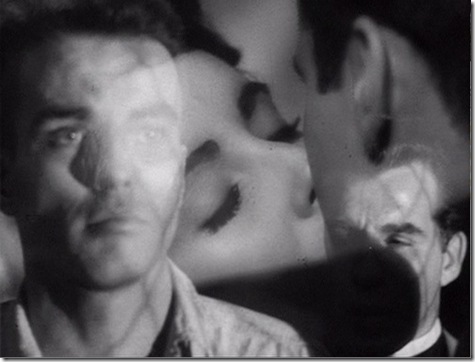
lap dissolve

6. WIPE: A wipe seems to push one shot off the screen as it replaces it with the next shot. The wipe, which comes with many variations, has been popular in science fiction, serials and action movies. but it has also been used in such diverse films as It Happened on Night, (1934), The Maltese Falcon (1941), The Seven Samurai (1954), Ed Wood (1994) and Battlefield Earth (2000).

Many other transitions are used but much less often than these six mentioned above. We will post more on video editing techniques on the Digital Filmmaking Blog in the coming days,

Wednesday, August 08, 2012

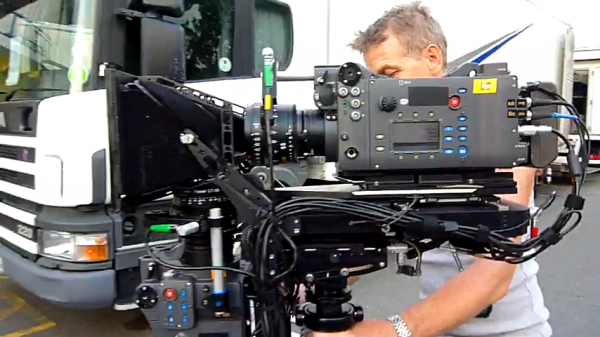
Arri Alexa - a film style digital camcorder

The Arri Alexa is a film-style digital motion picture camera system made by Arri first introduced in April 2010. The camera marked Arri's first major transition into digital cinematography after smaller previous efforts such as the Arriflex D-20 and D-21. 

It features modularity, PL mount lenses, and a Super 35 sized CMOS sensor shooting up to 2880 x 2160 resolution.

Arri Alexa being used during the shoot of Transformers 3

Hands-on reports say the Alexa’s controls are similar to a film camera and include FPS, shutter, EI, and WB (white balance). Buttons control the functions and an LCD display shows all the camera settings at once.

Arri offers the following models in its Alexa range:

Alexa
The first camera of the Alexa product family. Introduced in April of 2010.

Alexa Plus
The ALEXA Plus adds integrated wireless remote control, the ARRI Lens Data System (LDS), additional outputs, lens synchronization for 3D, and built-in position and motion sensors.

Alexa Plus 4:3
The ALEXA Plus adds integrated wireless remote control, the ARRI Lens Data System (LDS), additional outputs, lens synchronization for 3D, and built-in position and motion sensors and a 4:3 sensor making it ideal for anamorphic cinematography.

Alexa M
The Alexa M has its imaging and processing unit broken down in two parts to be small, compact and leightweight for 3D rigs and other uses where size is a concern.

Alexa Studio
The Alexa Studio features an optical viewfinder, mechanical shutter, and a 4:3 sensor making it ideal for anamorphic cinematography.

For full features of the above cameras check out the Alexa page on the Arri website.

ARRI ALEXA VS. RED ONE

The ARRI Alexa platform is aimed squarely at the RED ONE digital camera, itself already well established in the movie industry. RED digital cameras have been used by directors such as Steven Soderbergh, and on feature movies including Angels & Demons. ARRI has designed the Alexa for shooting feature movies, television dramas, and commercials.

VIDEO COMPARISON: ARRI ALEXA VS. RED ONE MYSTERIUM-X VS. RED ONE


Popular Film and TV series shot with Arri Alexa


Popular TV series Game of Thrones was shot with the Arri Alexa

2010: Upstairs, Downstairs, Anno 1790 (TV), Rosario

2011: Final Destination 5, Extremely Loud and Incredibly Close, Hugo, Prom, Game of Thrones (TV), Melancholia, Fringe season 4 (TV), The Three Musketeers, Doctor Who (TV), Jack and Jill, How to make it in America (TV), Once Upon a Time(TV)

2012: The Avengers, Life of Pi. Bel-Ami, Abraham Lincoln: Vampire Hunter, Gravity, The Gangster Squad, Skyfall, World War Z, This is Forty, Rock of Ages, The Dictator

In Bollywood, Tigmanshu Dhulia directed Sahib, Biwi aur Gangster (2011) became the first Bollywood film to be shot on Arri Alexa.

Better than Film?
According to cinematographer Roger Deakins, the Alexa’s tonal range, color space and latitude exceed the capabilities of film. Also, in terms of speed, resolution and clarity of image, the Alexa produces a better image than film cameras. "[T]his camera has brought us to a point where digital is simply better”, says Deakins.

Sunday, June 10, 2012

Shot Lister - An iOS App for Filmmakers

Vancouver filmmaker Zach Lipovsky, who is known for his work on Steven Spielberg's reality TV series On the Lot, has launched Shot Lister - an exciting new app that can help streamline the work on a film set.


Shot Lister has recently released on the App Store and for the first week it's at half price: $9.99. (only a day or two left)

Available for both the iPhone and the iPad (check out some cool ipad cases here), Shot Lister allows a filmmaker to build, organize, schedule and share shot lists digitally. Traditionally, AD’s carry a schedule document as a hard copy or as a PDF on their device with the inability to change or modify it. If changes need to be made, a laptop with the EP software would be needed – a time consuming process when other pressing things to be dealt with on set. (If you've worked on a film set you know how high stress levels usually are).


The scheduling app allows you to create a one-liner that has all the necessary information plus the ability to manage and adjust the schedule on the fly right from your iOS device. After putting in the shoot information into the app (either on the device or by importing from free template), you can then schedule out each day.

Not only do you schedule the order in which scenes are shot, but also the specific shots in each scene. You can then add the estimated time it would take for each shot and Shot Lister will let you know if you have enough time for what is scheduled.


Shot Lister’s Unique Features:

UNIVERSAL – share Shot Lister files on any iOS device, as well as full Retina Display Support.

INDUSTRY GRADE - Easily organize and store hundreds of scenes and thousands of shots with the flick of a finger

SCHEDULING - The only software available to easily create a shooting schedule on a shot by shot and minute by minute basis.

LIVE MODE - Experience the ground breaking “Live” production mode to see exactly how you are doing to the minute, and re-organize the day in a matter of seconds.

FULLY CUSTOMIZABLE - customize and order every category to your taste and needs. Also features a 24HR time preference.

DESKTOP IMPORT - Build shot lists in Excel or Numbers using our website templates then import them directly into Shot Lister

SHARING - Export PDFs of your shot list with or without estimated times, or share the entire Shot Lister project file via email with other crew members.

MULTI-CAM SUPPORT - Assign shots to different cameras and group them together to shoot simultaneously. Supports up to 11 cameras

CALENDAR VIEW - On iPad, display your entire shooting schedule as a calendar, just like the production board in the office.

COMPATIBILITY: Universal iOS 5.0+

About Reel Apps & Zach:

Reel Apps is about filmmakers creating apps for the industry – apps that save time, decrease paperwork, increase efficiency and look good doing it.

Zach Lipovsky, the designer of Shot Lister 1.0, is an indie filmmaker who shot to fame as the youngest filmmaker and only Canadian on Mark Burnett and Steven Spielberg’s search for the best new director on the TV series, On The Lot.  Then, while directing his first movie, a horror flick for SyFy, he created a temp version of the app to use on set and with rave reviews from crew, decided to create the full iOS version.